World of Warcraft Forever · Fishing bot

WCORE

Cast. Hear the bite. Reel it in. Again.

WCore fishes for you. It casts, listens for the splash, checks that it was your bobber, loots the catch and casts again, while you do something else. It knows the world by its own map and walks to your fishing place by itself. One PC is enough: WCore runs in a virtual machine next to the game (or on a second PC) and plays by picture, sound and key presses, like a player would.

Fish
116
Time
0:34:44
Per hour
200
Missed bites
0

One of our own sessions, straight from the program's header. Yours depends on the water and your connection.

How it reaches the game

Outside the game, like a player

WCore does not sit inside the game. It looks, listens and presses keys, from a virtual machine on your PC or from another PC.

One PC, with a virtual machine

The bot itself does not run next to the game: it runs in a virtual machine on the same PC (recommended) or on a second PC. Next to the game runs only a small Agent, which passes the picture and the sound on and presses the keys it is told to.

Picture, sound and its own map

It works from what a player gets: the screen and the speakers. To walk it plans the way on a map of the world kept on its own side. It never reads or changes the game's memory, and it does not patch the game's program.

Presses keys like you

It acts the way a player does: by pressing the same keys you would press, to cast and to walk.

This keeps WCore out of the game's insides. It is not a promise that it cannot be noticed: see the questions below.

What WCore does

It fishes and walks. You watch the numbers.

Everything on this page is in the program today.

Hears the bite

WCore listens to the game's own sound for the splash of a bite. No timers, no guessing: it reacts when the fish does.

Watches your bobber

It finds your bobber on the screen and checks that yours was the one that dipped, so another angler's splash does not waste your cast. It remembers your camera and puts it back, so the bobber stays in sight.

Live counters

Fish caught, time at work and fish per hour sit in the window's header the whole time. One click starts them over.

Knows what it caught

A list of everything that came out of the water, by kind, counted as it lands in your bags. Clear it whenever you want a fresh count.

One-click game setup

WCore sets the game up for you: the keys, auto loot and the sound it needs. Nothing to type, and nothing to redo after you restart the game.

Shows its work

A plain-words log of every cast and a live graph of what it hears. When something is off, you can see why, and so can we when you ask for help.

A map of the world

Kalimdor and the Eastern Kingdoms, with bankers, innkeepers, flight masters, vendors and mailboxes marked, zone borders, and where hostile creatures live. Search by name, double-click to walk there.

Fishing places on the map

Right-click the map to set a fishing place: the bot walks there and stands facing the water. Right-click the water next to it to turn it towards where the bobber should land.

Finds its own way

It plans every walk on the map: up stairs and over bridges, down the middle of the road, not along walls. If something the map does not know is in the way, it remembers the spot and goes round.

Inside WCore

Look around the program

A real session, not a mock-up. Click a page, here or in the window's own menu, and move over any part to see what it is.

The WCore window while fishing: counters in the header, the list of fish caught, the bobber as the bot sees it, and the sound graph
The Map page of WCore: the world with innkeepers, flight masters and vendors marked, zone borders and the fishing places
The Setup page of WCore: connect to the game PC, set up the game with one button, choose the sound device, remember the camera
The License page of WCore: until when this PC is licensed, and the code of this PC

Move over the picture (or tap a part) to see what it is

The map

A map of the world, made for walking and fishing

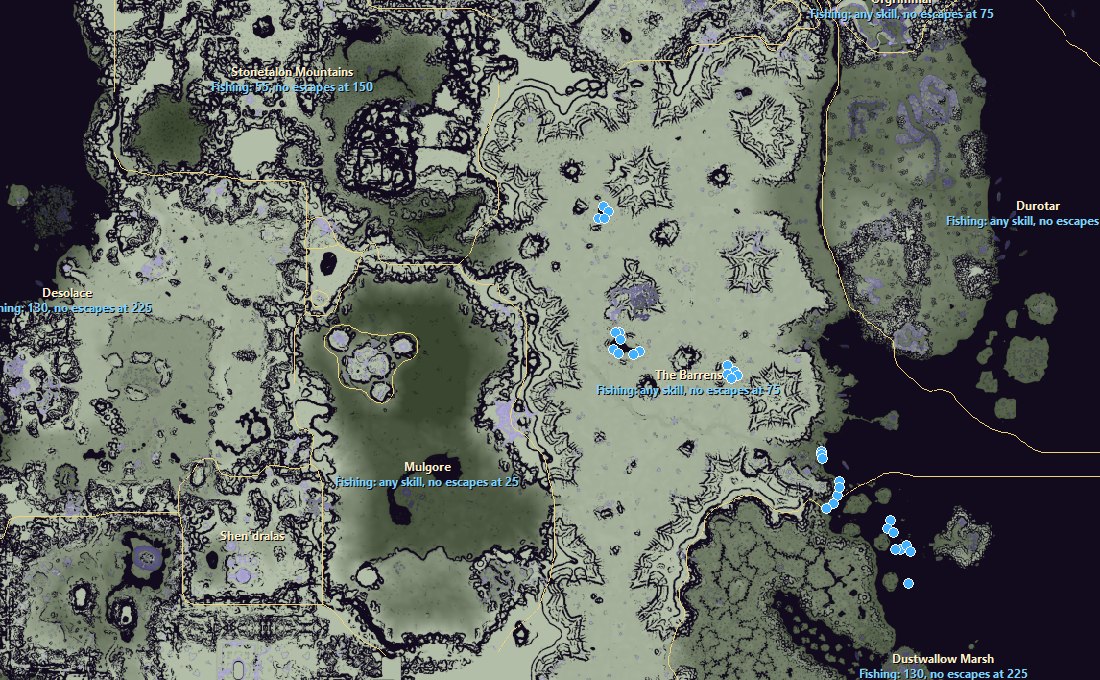
WCore has its own map of Kalimdor and the Eastern Kingdoms: where a character can stand, where the stairs, bridges and walls are, which zone asks what Fishing skill, and where the schools of fish are. These pictures are the program's own Map page.

The WCore map around The Barrens: every zone with its Fishing skill, and the schools of fish as blue dots

Fishing skill of every zone

How the map works

Made from the world itself

The ground, the water and every building of the game's world, cut into squares of one yard: where a character can stand, on which floor, and to which square next to it one can step. Stairs and bridges included, walls and cliffs not. The Map page downloads it once and then only what changed.

Knows where you are

The game itself tells your place and the way you face, twenty times a second: Set up the game types a small script into the game's chat that shows it as a strip of coloured squares in the corner of the screen, and WCore reads it from the picture. No addon, no reading of the game's memory.

Plans the way

The cheapest chain of steps on the map, where squares near walls and edges cost more: so the way keeps to the middle of the road, takes the stairs, and is straightened into lines. It differs a little from one walk to the next.

Walks it with keys

Forward and the turn keys, like you would, checking its place about twelve times a second. Stuck? It jumps, steps back and tries again. In a fight, dead, or with the game window not in front, it lets go of every key and says why.

Getting started

Four steps, once

WCore runs in a virtual machine on your gaming PC (recommended) or on a second PC, and works the game over the network.

WCore and the Agent

Put WCore in a Windows virtual machine on your PC (network set to Bridged) or on a second PC. Run the small Agent next to the game: it shows a six-digit PIN.

Connect and set up

In WCore press Find, type the PIN, and press the button that sets up the game.

Set the camera

Turn the game's camera so the bobber lands in plain sight in front of your character, and press Remember this camera.

Start fishing

Stand at the water with a rod, or let the bot walk to a fishing place on the map, press Start fishing, and leave the game window in front.

What you need

  • One Windows 10 or 11 PC (64-bit) with a Windows virtual machine for WCore (recommended), or two PCs on the same home network
  • World of Warcraft Forever, with the game's sound switched on
  • No .NET, no runtimes: just the two programs (and VirtualBox, VMware or Hyper-V for the virtual machine)
Pricing

One plan. Cheaper to start.

Full access from day one. The first month costs less, so you can see what it does for you.

Full access

WCore

$15 first 30 days

then $20 for every 30 days after

No tiers, no extras to buy.

  • Fishing, with the catch counted
  • The map, and walking by it
  • One-click game setup
  • Help on Discord
  • Updates while your access runs
Buy on Discord

Join the WCore Discord and open a ticket. A licence is for one PC: .

Not sure yet?
$53-day trial

Everything above for 3 days on one PC: fishing, the map, the walking. Like it? Go on with the first month at $15, on the same PC and with nothing to set up again.

Get the trial
Questions

Straight answers

What exactly does WCore do?
It fishes in World of Warcraft Forever without you at the keyboard: it casts, waits for the bite, reels in, loots and casts again. It counts what it catches and shows how fast it is going, and it can walk your character anywhere on its map of the world.
How does it find the way?
On a map of the world that comes with the program. The game shows where your character stands; WCore plans the way on its map, keeps to the middle of the road, takes stairs and bridges, and walks it with the same keys you would. You do not have to show it the way first.
How do I set a fishing place?
Start fishing at the water once, and the place is remembered. Or right-click the map and choose Fishing place here: the bot walks there and stands facing the water.
Do I need two computers?
No. The recommended way is one PC: the game and a small Agent run on it, and WCore runs in a Windows 10 or 11 virtual machine on the same PC (VirtualBox, VMware or Hyper-V). Set the virtual machine's network to Bridged (in Hyper-V: an External switch), so it sits in your home network next to the game. A second Windows PC in the same home network works too.
How does it know when a fish bites?
By the sound of the splash, checked against the picture of your own bobber: it watches the bobber about twelve times a second, so it tells your bite from another angler's. It looks at the screen and listens to the speakers, and presses the same keys you would.
How much does it cost?
$15 for the first 30 days, then $20 for every 30 days after that. One plan, everything included. To try it first: 3 days for $5.
How do I buy it?
Join our Discord and open a ticket. You get the two programs and a licence for your PC there. Came through a friend's link? Give the code the page showed you, so they get the credit.
Can the game notice it?
We do not promise that it cannot, and nobody honestly can. What WCore does to stay out of the game: the bot runs apart from it, in a virtual machine or on a second PC, it works from the picture, the sound and its own map, it presses keys like a player, and it never reads or changes the game's memory. What it cannot change: a small Agent does run on the PC with the game, and many hours of fishing in a row can be noticed from the game's side, whatever tool is used.
Is using it allowed by the game?
No. Automating the game is against Blizzard's Terms of Service, and accounts that use automation can be suspended or closed. WCore does not change that. If you use it, you do so at your own risk.